Peter S. Buswell (aka DrVoIP) is a rare blend of C-level executive leadership and deep technical expertise in telecommunications and cloud infrastructure. With a career that began at AT&T in 1970, he has founded and led multiple industry-defining companies, including Dextr.Cloud—acquired by AWS Global Partner CloudHesive. Peter has held senior roles at firms like Exxon Enterprises, Intervoice/Brite, and Franklin Telecommunications, and has consistently driven innovation from traditional PBX to Amazon Connect cloud deployments. A hands-on architect with certifications from Cisco (CCNP/CCDP, UCCX/UCCE) and AWS (Solutions Architect, Developer, SysOps), he combines strategic vision with engineering precision. Known as DrVoIP, he continues to bridge the gap between enterprise goals and technical execution in today’s evolving cloud communications landscape.
Does your Microsoft Outlook Integrate with your phone system?This functionality is getting to be the “minimum daily adult requirement” feature in the VoIP vendor space.We all just expect that our phone system “knows” about our “contacts”. We don’t dial phone numbers anymore!We enter Names and the phones system gets the number out of our contact list and places the call.Often, an incoming phone call to our desktop, will cause our contact information to be displayed.Some integrations enable your phone system to change user profiles and call handling modes based on your Outlook contact.Of late I have been wondering how far this integration can go?I mean, if I have a conference call scheduled in my Microsoft Outlook, shouldn’t the phone system know about that?My thinking is the phone system should just call me and remind me of the conference and then ask me to approve joining the meeting!
SIP trunks can be used for a wide variety of call processing solutions, some of which are very cost effective as in Free! We have used SIP tunks to interconnect ShoreTel systems over the Internet, complete with four digit dialing between systems! Most recently, we have been able to create a ShoreTel compatible audio conference server at a fraction of the cost normally associated with these servers. The most costly part of this conference solution was the ShoreTel SIP Trunk Licenses at $50 per port and the Server Hardware. SIP is a wonderful solution and enables you to interconnect a variety of exciting options to your VoIP solution that are vendor specific yet provide the highest level of interoperability. We now provide an audio conference server, (you provide the server) free to all of our ShoreTel annual support subscribers. We will send you a link to download the server, just for letting us quote your support contract renewal!
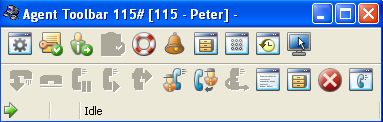
The ShoreTel Contact Center provides two strategies for call management at the desktop. We have found that the basic ‘agent tool bar’ is an excellent solution for call center desktops in which different shifts sit at the same desk, use the same computer and phone. It is easy enough to program the tool bar to prompt the agent for there log-in information. In this way, you can set up your phones with extension numbers that multiple agents can use. When an agent reports to work, they go to their assigned desk and log-in, using an extension that might have been used by a different Agent on the previous shift. The ShoreTel Contact Center keeps track of what agent used what extension during what time slot. On desks that are dedicated to an individual agent, the agent tool bar can be integrated into the ShoreTel Personal Call Manager. The Personal Call Manager looks like a Workgroup Agent call manager, but the tool bar indicates “contact center” and the drop down list contains information that is appropriate to the ShoreTel Contact Center or Enterprise Contact Center. There is one additional advantage of the stand alone Agent Tool bar. You can push custom parameters, named “call profiles” in ShoreTel documentation, to the Agent Tool bar. We find that you do not have the same flexibility with the Integrated Tool Bar inside the ShoreTel Personal Call Manager.
It is very normal to start planning a call center around the concept of DNIS, Groups, Agents and Skills. Experience has taught us, however, that call center design needs to start with a more important concept. Call Centers are performance oriented. We measure the number of calls presented, the number calls answered, the number of calls abandoned, average talk time, the average time a caller is waiting in queue for service and any number of other key parameters. We want to know call disposition, agent availability and how much time was used for lunch and breaks. Is the staff sized appropriately for the volume of calls that are arriving? Do we over flow excess call volume from one group to another group? How often do we do this and how long did callers waiting in the original queue before this happened? Do we Interflow from one call center to another? These parameters are all key characteristics of a call center and the very parameters we want to measure. For this reason, call center design should begin with the actual report that we want call center to produce in order to verify our performance! Lets construct the report we want to use to manage our business and from this document, we can best work backwards to creating the groups, agents, skills and Queue messages.
At first I had to think about why I would want LBS on my ShoreTel Mobile Call Manager? After all, it already alows me to change my call handling modes, access my voice mail and see my call history. I can assign my cell phone as my “external assignment” and go seat on the beach while managing all of my office phone calls as if I was sitting at my desk. So what do I need Location Based Services for? With ShoreTel Version 9 the GPS in my phone can use my current location to set my call handling mode and effectively change my external assignment. So when I am in the office, all the calls to my extension ring in at my desk. If I go out for lunch the GPS notes my location as “not in the office” changes my external assignement and my calls start rining in on my cell. When I finally get home from a long day at the beach, the GPS notes that I am home and assigns my extension to my home phone. Now that may not be the definition of fixed mobile convergence, but it works for me!
Every business desktop seems to have some type of customer or ticket management software solution. Outlook and Notes are very common personal contact managers, but other popular solutions include Salesforce, Goldmine, ACT, Microsoft CRM, Time Slips and the list goes on and on. Having a “record” pop up on your desktop based on Caller ID is the most common integration request we see. How about doing a reverse look up on an incoming phone call, to learn the identify of the caller. Google can do this, but how do you feed the Caller Id to the web application? Basically, there are three strategies for doing an integration of this type: DDE, Triggers and XML. Two of these methods (DDE and Triggers) are relatively straigh forward and within the ability of a competent system administrator. XML generally requires a product development commitment and software development resources. Fortunately we have been able to get ShoreTel to pass a wide range of system parameters to an external application using both DDE and Triggers. This makes everything an “Easy Pop”!
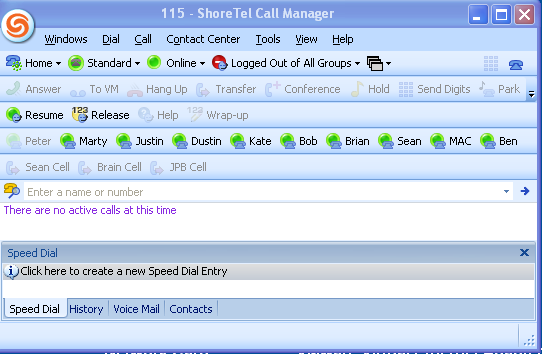
Are all your customers equal? Every business owner, large or small knows the answer to that question and the answer is no! We have Platinum, Gold, Silver and Bronze customers, each of which represents a different value to the business. For this reason, we often want to structure our call flow to prioritize these customers. You do not have to work in a “call center” to manage this priority scheme. The ShoreTel Personal Call Manager, for example, provides a visual call management tool that enables you to apply the concept of “priority call management”. I know the value of my current telephone conversation. It is the value of the next phone call that I want to be alert for. We have all had the experience of being on the phone talking and suddenly seeing the messaging waiting light illuminate on our phone! You immediately know that the very phone call you had been waiting for, slipped right past your ear and into the voice mail. With a personal call manager, I can see the next phone call as it arrives and take appropriate action. I can ask the current caller to hold. I have my ShoreTel Call Manager set so that a second important call to my desk can be sent to a greeting that says “Hi, I see you ringing in and if you hold the line, I will wrap up the call I am on and be right with you”. (Send me an email and I will share how I set that up). Optionally, I could have put the first call on hold and taken the second, higher priority caller. The issue is simply: when the financial, time or relationship value of the next call is more important, you will truly value having a visual, personal priority call manager only a click away!
Installing a VoIP solution has a wide range of technical issues that need to be addressed, organized and accounted for.From co-coordinating the “porting” of phone numbers from the old telephone carrier to the new carrier; to determining who has responsibility for providing DHCP and Time services to the new phone devices the technical detail is an endless check list.Generally, we always manage to get all of the technical details correctly identified and successfully implemented.The speeds and feeds all seem to work out and the phones come alive with dial tone and PSTN connectivity.The area that we as a professional service organization are always trying to improve, however, is the very important subject of call flow.Exactly what will an incoming caller to your place of business experience?Will there be a live answering point or will an automated attendant be used?How will calls be handled if the intended call processing solution, either the person or the automated solution is unavailable?Are calls received after normal business hours handled differently?If so how?What about holidays?Unfortunately, though the technical details of a new install are generally always successfully negotiated in time for the “go live”,the entire subject of “call flow” is often neglected until post cut over!Personally, I have found this area of a new installation to be the most demanding and least understood aspect of system design.If there is any area of a new system implementation that needs attention this would be it.The scripting of automated attendant and workgroup, contact center queues needs to be carefully crafted.Time needs to be allocated to the recording of these scripts and both on –hours and off-hour call flow testing needs to be accomplished.After all, the creation of a positive, effective and efficient call flow experience for your client base is what the telephone system is suppose to accomplish in the first place!
Call Handling modes has always been one of ShoreTel’s most popular user features. The concept is simple: define how you want the system to process an incoming phone call to your desk in case you are “out of the office”, “in a meeting” or “sitting at my desk”. Before ShoreTel, the company receptionist would have the responsibility of putting a caller on hold, calling your extension, finding out you are away from you desk and then asking the caller if they want to leave a message. For me the most exciting aspect of the ShoreTel Call Handling modesis the fact that the Operator no longer has to be responsible for call deposition. The Operator plays the role of greeting and salutation, but now each ShoreTel extension user can create their own call flow eliminating the requirement that Operator stay with the call until the very end. Typically the message acquisition and retrieval functions kick in if you are away from you extension, but ShoreTel has enabled the individual user to create more productive call flow resolution strategies.
If your job role is part of a larger group, it may be more appropriate to ask the caller to press zero to speak to another member of you team. Let’s not defer a client request for assistance or a new sale opportunity just because you were not at your desk! For those “must be found” professionals, ShoreTel has a very flexible “find me” call flow strategy. Just ask the caller to hold the line for a moment while ShoreTel tries to locate you when VoIP solutions in general and ShoreTel in particular. These call handling options are set by the individual, under the individuals control without system administration training and without requiring the Operator to keep other callers holding while desperately taking messages or trying to locate you. Now that is an example a increasing worker productivity!
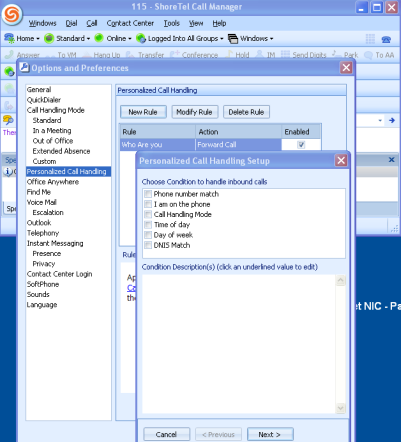
So how do you improve on this model? Well ShoreTel version 9 has done just that. Imagine the power of being able to create not only call handling modes, but call handling rules that are based on who is calling you! Maybe Friday phone calls need to be handled differently? What if we have several advertising campaigns and you want calls routed based on the number the caller dial (e.g. DNIS)? ShoreTel Version 9 has added a wealth of exciting new call flow options that are based on who is calling what number at what time. One of the most valued functions of a live Operator was the “call screening” function and now ShoreTel can even replicate that function, announcing the caller’s name and giving you an opportunity to accept or reject the call. The options for stream lining call flow to match client call handling goals are virtually unlimited.
In a VoIP world we no longer associate an individual to a specific desktop location or geographical. Using Call Handling modes and Personalize Call Handling options, every client call to your extension can be handled in a manner that best reflects your business goals. Operators do not have to keep an “in out” status board, or waste the valuable time of clients as different call resolution strategies are attempted. Each user now has complete authority to manage call flow excellence!
Prior to release of ShoreTel Contact Center Version 5.0,reporting was essentially statistical analysis.The Contact Center had very useful report generation capabilities that included the ability to add and delete columns to existing pre-defined reports.The reports, however, were generated largely as summary reports based on accumulated totals of events.For example, you could generate an Agent Performance report that could report the total number of calls presented; total call answered; average call holding time; average talk time over a specified interval.Though very useful for tracking aggregate call volume, the reports could not track individual agents events.The Shoretel Contact Center had no equivalent of the Call Detail Reporting that you might find in the ShoreTel IPBX database.What information was available, was derived by arithmetic manipulation of totals or the equivalent of “peg counters”.Each agent had a bucket for total calls, but the details of each call were not archived in the database.This led to reports that indicated total calls for the period were 19.2 as calls were averaged over an interval.
ShoreTel Contact Center 5.0 takes a major step forward in the area of reporting.A new feature named variously “interaction reporting” or “cradle to grave” reporting has made a major positive contribution to the contact centers already strong feature set.The database has also migrated from Sybase to MySQL, which completes the database migration strategy that ShoreTel began with version 7 of the IPBX.In the ECC database contains a table structure that can be generally summarized as a configuration database.A second database, named C2G has been created and does not appear in contact centers before version 5.This database contains about 22 tables of which four are effectively the equivalent of “CDR” records.A table named events, tracks all the incoming event detail and includes a GUID that can be used to link back to the CDR record in the IPBX.This database makes it possible to create very detailed reports.For example, assume you needed a report that listed each call handled by a specific agent over an specified interval.Additionally, you want the agent detail to include a call disposition statusor wrap code.Prior to the C2G database, this type of report would have been impossible.With the new C2G database, you can generate the report very easily using any MySQL administration tool, like SQLyog.Interaction reporting is a major step forward for ShoreTel Contact Center and one that the market will be very excited to receive.Look for a video update in our online library for a “hands on” look at how to setup configure and make use of Interaction reporting!